







 Please ask about problems and questions regarding this tutorial on answers.ros.org. Don't forget to include in your question the link to this page, the versions of your OS & ROS, and also add appropriate tags. Please ask about problems and questions regarding this tutorial on answers.ros.org. Don't forget to include in your question the link to this page, the versions of your OS & ROS, and also add appropriate tags. |
Using the Articulation Model Library (C++)
Description: This tutorial demonstrates how to use the articulation model library directly in your programs. This is more efficient than sending ROS messages or ROS services. In this tutorial, a short program is presented that creates an artificial trajectory of an object rotating around a hinge, and then uses the model fitting library to recover the rotational center and radius. Further, the sampled trajectory and the fitted model are publishes as a ROS message for visualization in RVIZ.Keywords: articulation models, kinematic trajectory, model selection, model fitting, roscpp, cpp
Tutorial Level: INTERMEDIATE
Contents
Introduction
Articulation models describe the kinematic trajectories of articulated objects, like doors, drawers, and other mechanisms. Such models can be learned online and in real-time, while a robot is pulling a door open. The articulation stack in the ALUFR-ROS-PKG repository provides several functions for fitting, selecting, saving and loading articulation models. This tutorial demonstrates how to use the articulation model library directly in your programs. This is more efficient than sending ROS messages or ROS services. In this tutorial, a short program is presented that creates an artificial trajectory of an object rotating around a hinge, and then uses the model fitting library to recover the rotational center and radius. Further, the sampled trajectory and the fitted model are publishes as a ROS message for visualization in RVIZ.
Download and Compile
All we need for this tutorial is the articulation_rviz_plugin and its dependency. We assume that you have already installed the basic components of ROS, checked out the ALUFR-ROS-PKG repository at Google Code.
cd ~/ros
svn co https://alufr-ros-pkg.googlecode.com/svn/trunk alufr-ros-pkg
For compilation, type
rosmake articulation_rviz_plugin
which should build (next to many other things) the RVIZ , the articulation_models and the articulation_rviz_plugin package.
Create a new package
Create a new package that depends on articulation_rviz_plugin. This also provides us with the messages defined in articulation_msgs, and the model selection library from articulation_models.
roscreate-pkg test_articulation articulation_rviz_plugin
Create a C++ ROS node for model fitting
Copy and paste the following code to a file named model_fitting_demo.cpp. This program simulates the position of an object rotating around a hinge. In each iteration of the main loop, a new pose is sampled, and added to the pose-vector of the articulation_msgs/ModelMsg message. Calling factory.restoreModel turns this struct subsequently into a C++ object. This object is of type articulation_models::GenericModel, and offers methods for fitting (fitModel), evaluating (evaluateModel) and setting and getting parameters (getParam and setParam). For this demonstration, a few of the fitted parameters, like center of rotation and radius, are printed to the screen. Also, the model object can return an updated model message (using the getModel()-method). This message is then published to the /model topic.
   1 /*
   2  * model_fitting_demo.cpp
   3  *
   4  *  Created on: Jun 8, 2010
   5  *      Author: sturm
   6  */
   7
   8 #include <ros/ros.h>
   9
  10 #include "articulation_models/models/factory.h"
  11
  12 #include "articulation_msgs/ModelMsg.h"
  13 #include "articulation_msgs/TrackMsg.h"
  14 #include "articulation_msgs/ParamMsg.h"
  15
  16 using namespace std;
  17 using namespace articulation_models;
  18 using namespace articulation_msgs;
  19
  20 #include <boost/random.hpp>
  21 #include <boost/random/normal_distribution.hpp>
  22
  23 int main(int argc, char** argv) {
  24         ros::init(argc, argv, "model_fitting");
  25         ros::NodeHandle n;
  26         ros::Publisher model_pub = n.advertise<ModelMsg> ("model", 5);
  27         ros::Rate loop_rate(5);
  28         int count = 0;
  29
  30         boost::normal_distribution<> nd(0.0, 0.02);
  31         boost::mt19937 rng;
  32         boost::variate_generator<boost::mt19937&, boost::normal_distribution<> >
  33                         var_nor(rng, nd);
  34
  35         MultiModelFactory factory;
  36
  37         while (ros::ok()) {
  38                 ModelMsg model_msg;
  39                 model_msg.name = "rotational";
  40                 ParamMsg sigma_param;
  41                 sigma_param.name = "sigma_position";
  42                 sigma_param.value = 0.02;
  43                 sigma_param.type = ParamMsg::PRIOR;
  44                 model_msg.params.push_back(sigma_param);
  45
  46                 model_msg.track.header.stamp = ros::Time();
  47                 model_msg.track.header.frame_id = "/";
  48                 model_msg.track.track_type = TrackMsg::TRACK_POSITION_ONLY;
  49
  50                 for (int i = 0; i < 100; i++) {
  51                         geometry_msgs::Pose pose;
  52                         pose.position.x = cos(i / 100.0 + count / 10.0)+var_nor();
  53                         pose.position.y = sin(i / 100.0 + count / 10.0)+var_nor();
  54                         pose.position.z = var_nor();
  55                         pose.orientation.x = 0;
  56                         pose.orientation.y = 0;
  57                         pose.orientation.z = 0;
  58                         pose.orientation.w = 1;
  59                         model_msg.track.pose.push_back(pose);
  60                 }
  61
  62                 GenericModelPtr model_instance = factory.restoreModel(model_msg);
  63                 model_instance->fitModel();
  64                 model_instance->evaluateModel();
  65
  66                 cout << "model class = "<< model_instance->getModelName() << endl;
  67                 cout << "       radius = "<<model_instance->getParam("rot_radius")<< endl;
  68                 cout << "       center.x = "<<model_instance->getParam("rot_center.x")<< endl;
  69                 cout << "       center.y = "<<model_instance->getParam("rot_center.y")<< endl;
  70                 cout << "       center.z = "<<model_instance->getParam("rot_center.z")<< endl;
  71                 cout << "       log LH = " << model_instance->getLikelihood() << endl;
  72
  73                 ModelMsg fitted_model_msg = model_instance->getModel();
  74                 model_pub.publish(fitted_model_msg);
  75
  76                 ros::spinOnce();
  77                 loop_rate.sleep();
  78                 ++count;
  79         }
  80 }
Creating a launch file
Although the demo program from above can be run as a stand-alone node, it is easier to inspect visually what is going on. To that purpose, RViz with the ModelMsg-plugin can be used.
<launch>
        <node pkg="articulation_tutorials" type="model_fitting_demo" name="test_fitting" output="screen" />

        <node pkg="rviz" type="rviz" output="screen" name="rviz" args="-d $(find articulation_tutorials)/cpp_model_fitting/display_grid_axes_model.vcg" />

</launch> |
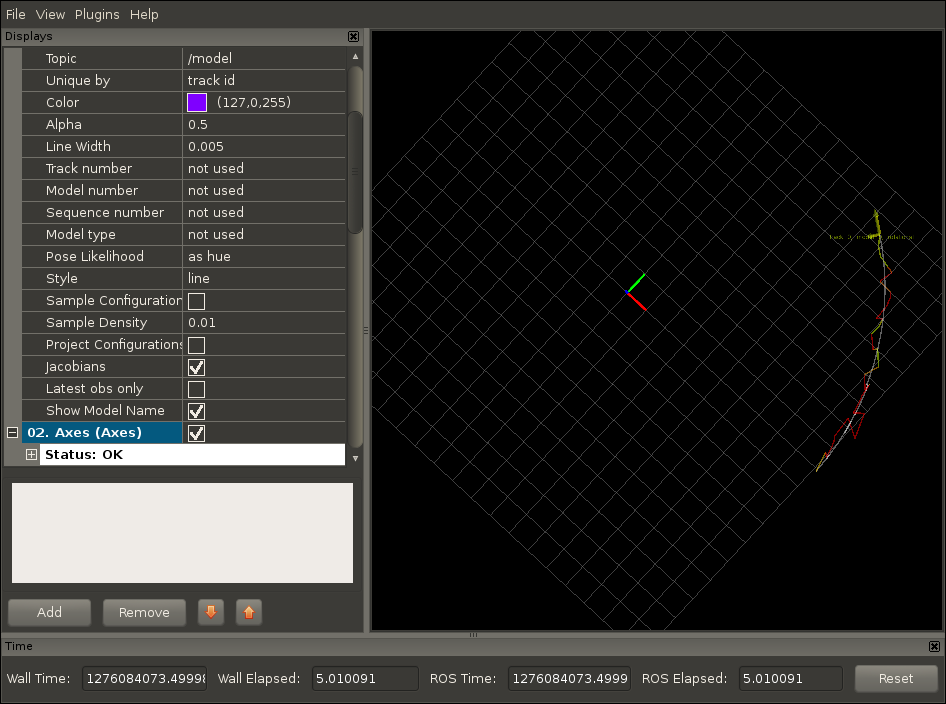
The C++ node presented in this tutorial samples positions of an object rotating around the z-axis with a radius of 1m. The RVIZ model visualization plugin shows both the trajectory, colored green/red according to the individual pose likelihoods, and the fitted model in gray |
Demo output (Screen)
This is some example output of the demonstration program presented in this tutorial. Note that the rotational model needs at least 4 poses before it can compute the model coefficients. Also note, that the initial estimate of the model coefficients is very poor when only the first few centimeters (with sigma=2cm noise) are observed. The estimates quickly improve after a longer trajectory has been observed.
model class = rotational
        radius = 1
        center.x = 0
        center.y = 0
        center.z = 0
        log LH = -nan
[ INFO] [1276083891.231585290]: Loading general config from [/home/lollypop/sturm/.rviz/config]
[ INFO] [1276083891.232050690]: Loading display config from [/home/lollypop/sturm/.rviz/display_config]
model class = rotational
        radius = 1
        center.x = 0
        center.y = 0
        center.z = 0
        log LH = -nan
points:3
RotationalModel: fitPlane failed
model class = rotational
        radius = 1
        center.x = 0
        center.y = 0
        center.z = 0
        log LH = -nan
points:4
model class = rotational
        radius = 0.180308
        center.x = 0.960925
        center.y = 0.0613411
        center.z = 0.188755
        log LH = -0.290972
points:5
model class = rotational
        radius = 1117.88
        center.x = -362.016
        center.y = 469.342
        center.z = 947.452
        log LH = -0.651335
points:6
model class = rotational
        radius = 555.041
        center.x = -176.694
        center.y = 69.0765
        center.z = 521.298
        log LH = -0.927887
points:7
model class = rotational
        radius = 0.135209
        center.x = 1.03131
        center.y = 0.0515943
        center.z = -0.100709
        log LH = -2.17121
points:8
model class = rotational
        radius = 0.271709
        center.x = 0.977617
        center.y = 0.200966
        center.z = 0.25174
        log LH = -1.18562
points:9
model class = rotational
        radius = 1.34235
        center.x = 1.27822
        center.y = -0.0666502
        center.z = -1.28642
        log LH = -1.12099
points:10
model class = rotational
        radius = 662.294
        center.x = 264.891
        center.y = -55.9791
        center.z = -604.851
        log LH = -0.976538
points:11
model class = rotational
        radius = 0.362923
        center.x = 0.820574
        center.y = 0.160068
        center.z = 0.288078
        log LH = -1.01913
points:12
model class = rotational
        radius = 0.456756
        center.x = 0.734882
        center.y = 0.185757
        center.z = 0.360662
        log LH = -0.760279
points:13
model class = rotational
        radius = 0.429472
        center.x = 0.791086
        center.y = 0.188593
        center.z = 0.362659
        log LH = -0.79271
points:14
model class = rotational
        radius = 0.380097
        center.x = 0.754191
        center.y = 0.19568
        center.z = 0.27918
        log LH = -0.890839
points:15
model class = rotational
        radius = 0.510351
        center.x = 0.700314
        center.y = 0.183675
        center.z = 0.404699
        log LH = -0.806198
points:16
model class = rotational
        radius = 0.592625
        center.x = 0.452138
        center.y = 0.125068
        center.z = 0.225673
        log LH = -0.805371
points:17
model class = rotational
        radius = 0.681178
        center.x = 0.57213
        center.y = 0.175353
        center.z = 0.527507
        log LH = -0.81509
points:18
model class = rotational
        radius = 0.611191
        center.x = 0.60594
        center.y = 0.208415
        center.z = 0.470494
        log LH = -1.06384
points:19
model class = rotational
        radius = 0.684332
        center.x = 0.354202
        center.y = 0.105043
        center.z = 0.228971
        log LH = -0.686269
points:20
model class = rotational
        radius = 0.723053
        center.x = 0.368001
        center.y = 0.116914
        center.z = 0.354212
        log LH = -0.6778
points:21
model class = rotational
        radius = 0.68478
        center.x = 0.352511
        center.y = 0.10448
        center.z = 0.225485
        log LH = -0.634019
points:22
model class = rotational
        radius = 0.711196
        center.x = 0.379455
        center.y = 0.118657
        center.z = 0.350076
        log LH = -0.638756
points:23
model class = rotational
        radius = 0.751677
        center.x = 0.348053
        center.y = 0.110153
        center.z = 0.376941
        log LH = -0.670791
points:24
model class = rotational
        radius = 0.761347
        center.x = 0.420902
        center.y = 0.137444
        center.z = 0.496227
        log LH = -1.10818
points:25
model class = rotational
        radius = 0.868042
        center.x = 0.327393
        center.y = 0.108216
        center.z = 0.551141
        log LH = -1.1696
points:26
model class = rotational
        radius = 1.01176
        center.x = 0.0587054
        center.y = 0.0105799
        center.z = 0.358562
        log LH = -1.05315
points:27
model class = rotational
        radius = 1.61691
        center.x = -0.425125
        center.y = -0.236657
        center.z = 0.640292
        log LH = -1.16074
points:28
model class = rotational
        radius = 1.0924
        center.x = -0.0450039
        center.y = -0.0218906
        center.z = 0.291469
        log LH = -1.02786
points:29
model class = rotational
        radius = 0.961882
        center.x = 0.0745566
        center.y = 0.0108829
        center.z = 0.242933
        log LH = -1.03783
points:30
model class = rotational
        radius = 1.05601
        center.x = -0.0477931
        center.y = -0.0255933
        center.z = -0.0205304
        log LH = -1.00237
points:31
model class = rotational
        radius = 1.11501
        center.x = -0.0912058
        center.y = -0.049268
        center.z = -0.175049
        log LH = -7.41091
points:32
model class = rotational
        radius = 0.960844
        center.x = 0.0406013
        center.y = 0.0287704
        center.z = -0.141344
        log LH = -5.95775
points:33
model class = rotational
        radius = 1.0852
        center.x = -0.0725985
        center.y = -0.0393999
        center.z = -0.0886639
        log LH = -5.60011
points:34
model class = rotational
        radius = 1.04272
        center.x = 0.0103253
        center.y = -0.0334244
        center.z = 0.247143
        log LH = -1.21064
points:35
model class = rotational
        radius = 0.885302
        center.x = 0.104408
        center.y = 0.0641665
        center.z = 0.046224
        log LH = -0.977554
points:36
model class = rotational
        radius = 1.04713
        center.x = -0.0170094
        center.y = -0.0445478
        center.z = 0.117126
        log LH = -0.999225
points:37
model class = rotational
        radius = 0.995899
        center.x = 0.0121307
        center.y = -0.00314552
        center.z = 0.0674619
        log LH = -1.00695
points:38
model class = rotational
        radius = 1.02188
        center.x = -0.013386
        center.y = -0.0171478
        center.z = 0.0320113
        log LH = -0.967128
points:39
model class = rotational
        radius = 1.04887
        center.x = -0.0366193
        center.y = -0.0304123
        center.z = 0.0628515
        log LH = -1.0118
points:40
model class = rotational
        radius = 1.03742
        center.x = -0.0273324
        center.y = -0.0250118
        center.z = 0.0393251
        log LH = -0.986585